The Overview tab
Go to WPHEKA > Server Info. The page opens on the Overview tab. The other tabs are PHP and Database and Help.
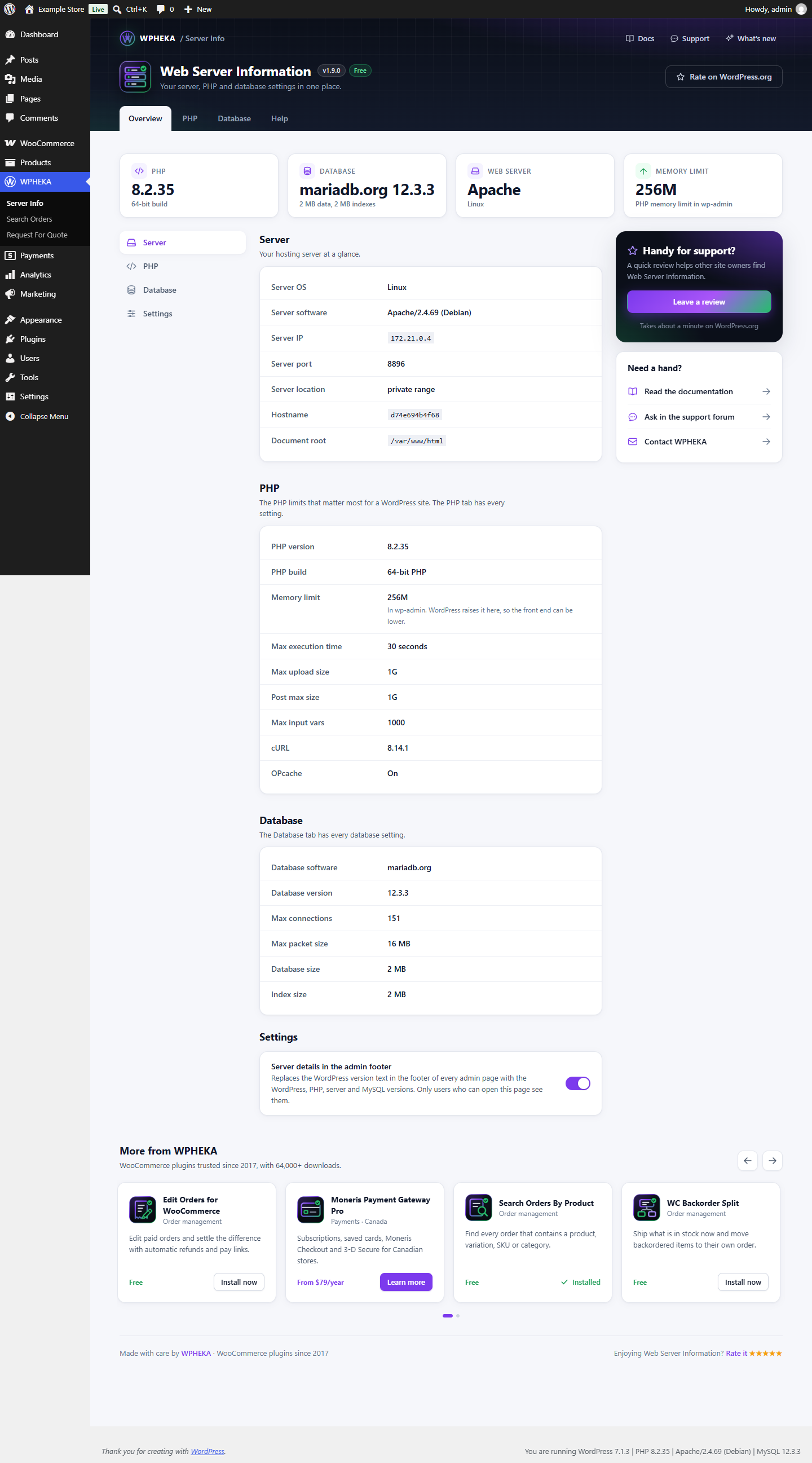
The plugin shows values only. It doesn't judge them as good or bad, because what a site needs depends on its plugins and traffic.
The cards at the top
| Card | What it shows |
|---|---|
| PHP | Your PHP version and whether PHP is a 32-bit or 64-bit build |
| Database | The database software and version (for example MySQL or MariaDB), with the size of your data and indexes |
| Web server | The web server software (for example Apache or nginx), with the server's operating system |
| Memory limit | The PHP memory limit in wp-admin |
Server
Your hosting server at a glance.
| Row | What it shows |
|---|---|
| Server OS | The operating system |
| Server software | The full web server name and version |
| Server IP | The server's IP address |
| Server port | The port the site is served on |
| Server location | The city and country of the server, looked up from its IP address |
| Hostname | The server's host name |
| Document root | The folder the web server serves your site from |
A value that can't be read shows Not available.
The server location comes from IP-API.com. The plugin sends it the server's IP address when you open the page and keeps the answer for a week. If the lookup fails, it tries again after an hour. See IP-API's terms and policies.
PHP
The PHP limits that matter most for a WordPress site. The PHP tab has every setting.
| Row | What it shows |
|---|---|
| PHP version | For example 8.2.29 |
| PHP build | 32-bit or 64-bit PHP |
| Memory limit | In wp-admin. WordPress raises it there, so the front end can be lower. |
| Max execution time | How long a request may run (or No limit) |
| Max upload size | The largest file you can upload |
| Post max size | The largest form submission, uploads included |
| Max input vars | How many fields a form may send. Large menus and settings pages need more. |
| cURL | The cURL version (or Not installed) |
| OPcache | On, Off or Not installed |
Database
The same details as the top of the Database tab: software, version, max connections, max packet size, database size and index size.
Settings
Server details in the admin footer (default: on): replaces the WordPress version text in the footer of every admin page with the WordPress, PHP, server and MySQL versions. Only users who can open the Server Info page see them.
Switch it off and click Save changes to bring back WordPress' own footer.
On a multisite network where the plugin is network-activated, the setting applies to the whole network and only a network administrator can change it. Site administrators see it as On or Off.
Help tab
Links to the documentation, the support forum and the changelog.