The Requests tab
Go to WPHEKA > Request For Quote > Requests. It lists every quote request customers sent, newest first, 20 per page. The tab shows how many requests are New.
Requests are stored from version 1.9.0. Requests sent before that only exist as emails.
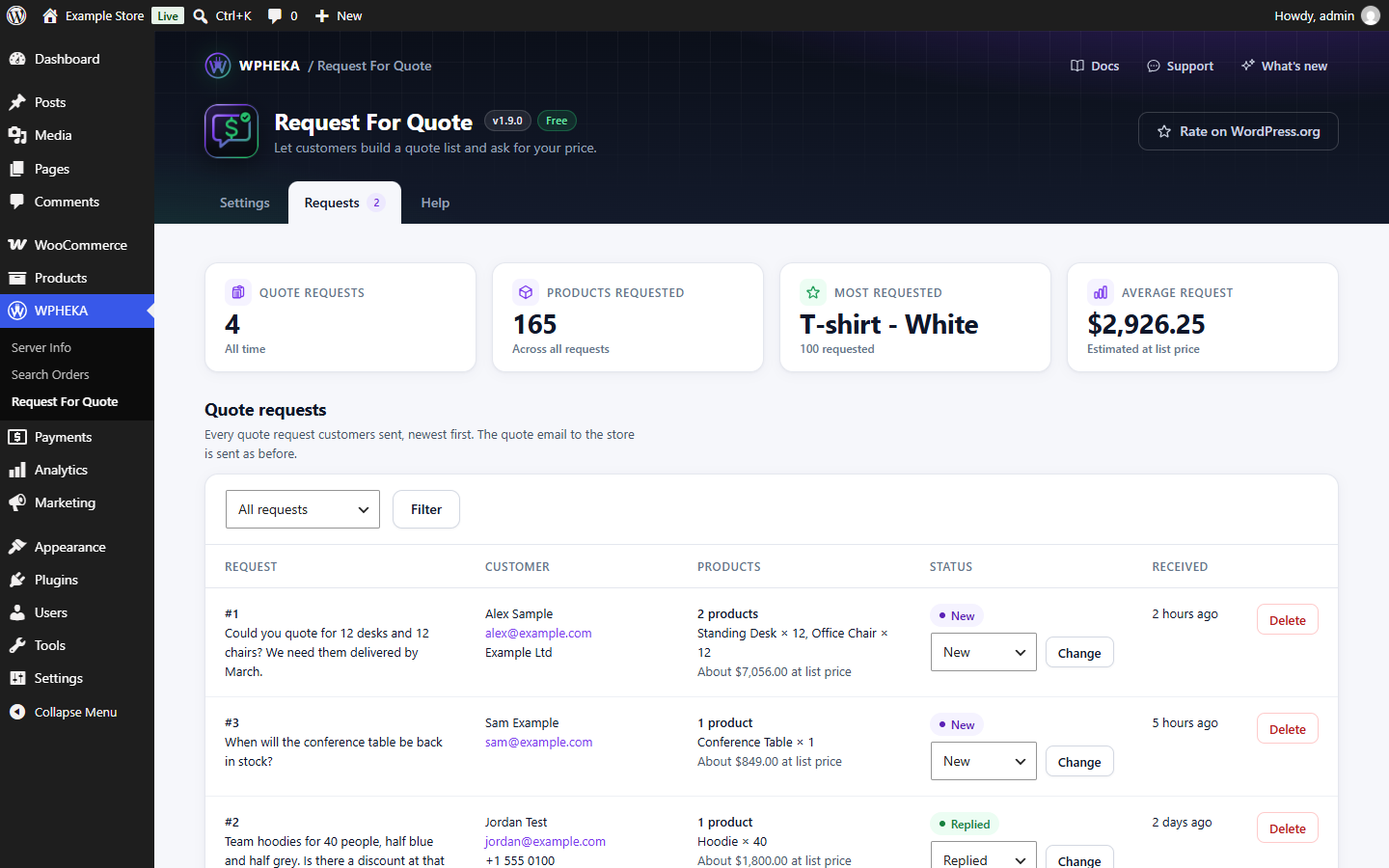
What each row shows
| Column | What it shows |
|---|---|
| Request | The request number and the start of the customer's message |
| Customer | Name and email address, plus company and phone number when given |
| Products | How many products, each with its quantity, plus the estimated total at list price |
| Status | New, Replied or Closed |
| Received | How long ago. Hover for the date and time. |
Working through requests
- Reply to the customer from your own email. Click their address to start one.
- Set the status: choose Replied or Closed and click Change.
- To see only some requests, choose a status at the top and click Filter. All requests shows them all again.
Every new request starts as New. Changing the status only changes it here; the customer isn't told.
Deleting a request
Click Delete and confirm. This can't be undone.
Personal data
Stored requests hold the customer's name, email address, message and, when given, phone number and company. They are included in WordPress's personal data tools:
- Tools > Export Personal Data includes every request sent with that email address;
- Tools > Erase Personal Data deletes them.
The plugin also suggests text for your privacy policy under Settings > Privacy.