Installation and licence
Install
- Install and activate the free WPHEKA Search & Filter Orders by Product from Plugins > Add New Plugin. Pro needs version 4.1.0 or later.
- Download the Pro zip from My account > API downloads on wpheka.com.
- In WordPress, go to Plugins > Add New Plugin > Upload Plugin, choose the zip and click Install Now.
- Click Activate Plugin.
- Open WooCommerce > Orders. The Advanced filters button sits next to Filter.
If the free plugin is missing or too old, Pro shows a notice on the plugins screen and does nothing else until it is installed or updated.
Activate your licence
The licence key turns on automatic updates and support. Every feature works without it.
- Go to WPHEKA > Search Orders.
- Under Pro licence, paste the key from your order email or from My account > API keys on wpheka.com.
- Click Activate.
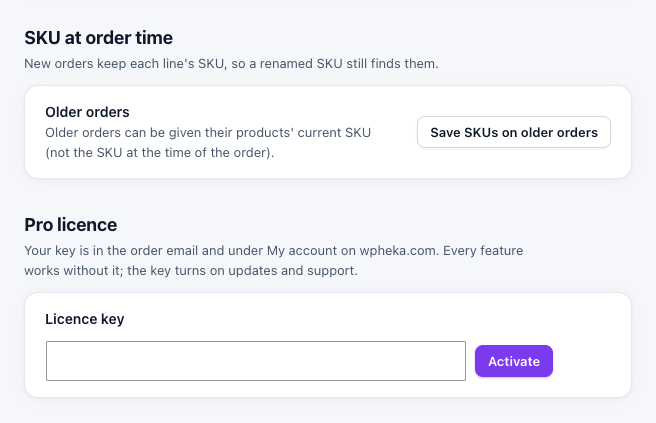
The section then shows Active and the last four characters of the key. The same key works for the single site, 5 site and 25 site licences; the plugin finds which one it belongs to.
Move the licence to another site
On the old site, go to WPHEKA > Search Orders > Pro licence and click Deactivate on this site. Then activate the key on the new site.
If activation fails
The message under Pro licence comes from the licence server. The usual causes:
- No activations left: the key is already active on as many sites as the licence allows. Deactivate it on a site you no longer use or manage activations under My account > API keys on wpheka.com.
- The key is not recognised: copy it again from the order email, without spaces.
- The server could not be reached: your site could not connect to wpheka.com. Try again later or ask your host whether outgoing connections are blocked.
Updates
With an active licence, new versions appear under Dashboard > Updates like any other plugin. What changed in each version is on the changelog page.
If the licence expires, the plugin keeps working as it is. Only updates and support stop until you renew.