Open for changes
New in 1.4.0, off by default.
While a customer can still change a paid order, it waits in its own status, Open for changes, instead of Processing. Warehouse and shipping tools that pick up Processing orders don't see it yet. When the time for changes ends, the order moves to Processing once and normal fulfilment starts.
Turn it on
Go to WPHEKA > Edit Orders > Settings > Customer changes and switch on Hold new orders while customers can change them. It is shown while customer changes are on.
Which orders wait
Only orders paid at checkout:
- card and other online payments (when WooCommerce would set Processing);
- cash on delivery orders, with the same switch.
These never wait:
- orders you move to Processing by hand, in bulk or through the REST API;
- orders that go On hold first, such as bank transfer, cheque or card payments authorized but not captured;
- virtual and downloadable orders, which WooCommerce completes straight away;
- orders you create in the admin;
- balance orders;
- WooCommerce Subscriptions renewals, switches and resubscribes;
- orders with a product you never offer changes for.
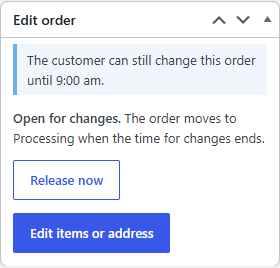
When an order starts waiting, a note says "Open for changes until 3:40 pm. The order moves to Processing after that."
What still happens at payment
The order counts as paid:
- stock is reduced;
- the customer gets the usual "Processing order" email and you get "New order";
- WooCommerce Analytics counts the sale;
- downloads are available as for a Processing order.
Nothing is sent again when it moves to Processing.
When it moves to Processing
| What happens | Note on the order |
|---|---|
| The time for changes ends | "Released to Processing: the time for changes ended." |
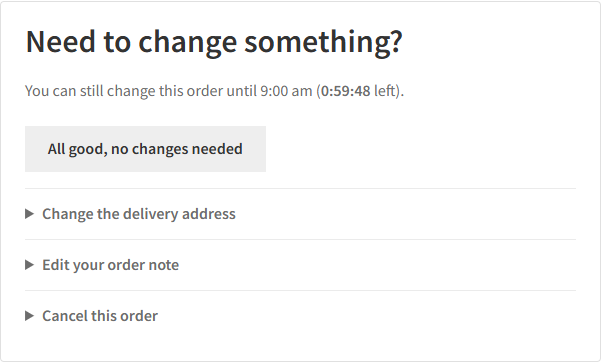
| The customer clicks "All good, no changes needed" | "... the customer confirmed the order as it is." |
| A tracking number or fulfilment is added | "... a tracking number or fulfilment was added." |
| You click Release now in the order's Edit order box | "Released to Processing by" your name |
The release runs on WooCommerce's scheduled actions. If your site doesn't run them (cron off on a staging copy), opening the Orders screen or a customer's order page releases any order whose time has passed.
If a held order is cancelled, refunded or moved to another status by hand, it simply leaves the hold.

What customers see
On the thank-you page and their order page: "You can still change this order until 3:40 pm." with the time left. Their orders list in My Account shows the status Open for changes.
Turning it off, deactivating, uninstalling
- Turned off (or customer changes turned off): every held order moves to Processing at once. Customers can still change those orders until their time ends.
- Plugin deactivated or deleted: every held order moves to Processing first, so no order is left in a status WooCommerce no longer knows.
- Plugin folder removed by hand: deactivate first. If you didn't, reactivating the plugin moves any held order it finds to Processing.
Your other plugins
Plugins that act when an order reaches Processing see the order when it moves there, not at checkout. That includes shipping label, warehouse and fulfilment tools and your own integrations reading status=processing. In the REST API and webhooks the status is open-for-changes.
A plugin that listens only for one exact change, such as "Pending payment to Processing", never sees a held order: the order goes from Pending payment to Open for changes, then from Open for changes to Processing. Test such integrations with the hold on before you use it on a live store, or check with the plugin's author.