The Edit Orders page
Go to WPHEKA > Edit Orders. It has three tabs: Settings, Activity and Help.
- Staff who can edit orders (
edit_shop_orders) can open the page, see Activity and Help and answer cancellation requests. - The Settings tab needs the same permission as WooCommerce's own settings (
manage_woocommerce).
Change what you need on the Settings tab, then click Save changes.
The numbers at the top
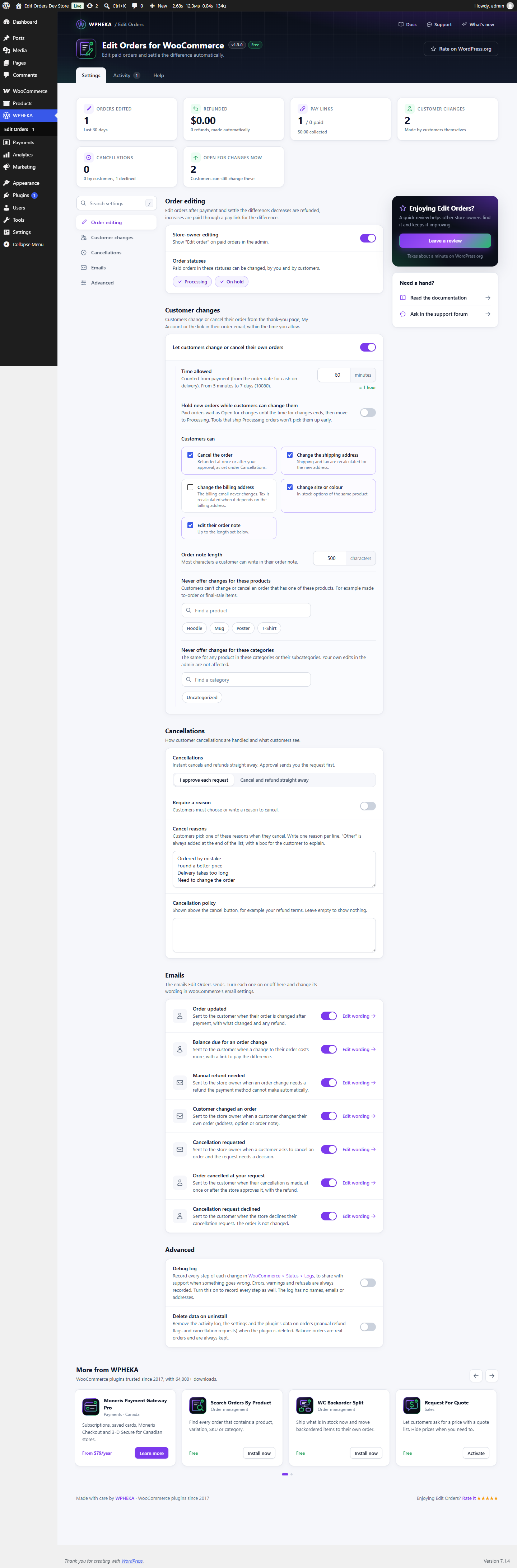
The last 30 days, on the Settings and Activity tabs:
| Tile | What it shows |
|---|---|
| Orders edited | Orders changed, by you or by customers |
| Refunded | The amount refunded automatically and how many refunds |
| Pay links | Pay links sent and how many were paid, with the amount collected |
| Customer changes | Changes customers made themselves and how many said "All good" |
| Cancellations | Orders cancelled: how many by customers and how many requests were declined |
| Open for changes now | Orders customers can still change right now and how many are held as Open for changes |
Order editing
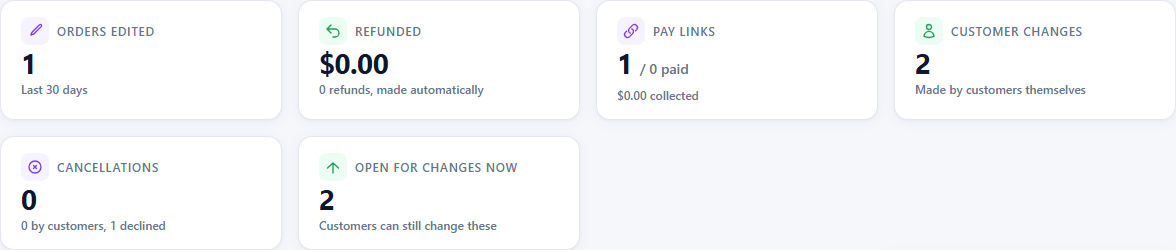
| Setting | Default | What it does |
|---|---|---|
| Store-owner editing | On | Shows "Edit order" on paid orders in the admin |
| Order statuses | Processing, On hold | Paid orders in these statuses can be changed, by you and by customers |
Customer changes
| Setting | Default | What it does |
|---|---|---|
| Let customers change or cancel their own orders | On | The panel on the thank-you page, My Account and the order email |
| Time allowed | 60 minutes | Counted from payment (from the order date for cash on delivery). From 5 minutes to 7 days (10080). |
| Hold new orders while customers can change them | Off | Paid orders wait as Open for changes until the time ends. See Open for changes. |
| Customers can | All on* | Cancel the order, change the shipping address, change the billing address, change size or colour, edit their order note |
| Order note length | 500 characters | From 20 to 2000 |
| Never offer changes for these products | None | Your 500 newest products are listed; exclude a category to cover more |
| Never offer changes for these categories | None | Subcategories are included. Your own edits are not affected. |
* On a store updated from a version before 1.3.0, "Change the billing address" starts off, so customers see no change until you turn it on.
Cancellations
| Setting | Default | What it does |
|---|---|---|
| Cancellations | I approve each request | Or "Cancel and refund straight away" |
| Require a reason | Off | Customers must choose or write a reason |
| Cancel reasons | Four reasons | One per line. "Other" is always added at the end. |
| Cancellation policy | Empty | Shown above the cancel button |
See Cancellations.
Emails
Each of the seven emails, with a switch and an Edit wording link to WooCommerce's email settings. See Emails.
Advanced
| Setting | Default | What it does |
|---|---|---|
| Debug log | Off | Records every step of each change in WooCommerce > Status > Logs, source wpheka-edit-orders-for-woocommerce, to share with support. Errors, warnings and refusals are always recorded. The log has no names, emails or addresses. |
| Delete data on uninstall | Off | Removes the activity log, the settings and the plugin's data on orders when the plugin is deleted. Balance orders are real orders and are always kept. |
Activity
- Cancellation requests waiting for your decision.
- Activity: every change made with Edit Orders, by you, by customers or automatically: edits, balance orders created and paid, cancellations, note changes, "All good" and Open for changes. Filter by change and by date.
Help
Links to the documentation, the support forum and the changelog.
System Status
WooCommerce > Status > System Status has an Edit Orders section with the plugin's settings, the tax and payment set-up and counts of orders that need attention. Include it when you ask for support.