Customer changes
Customers can change or cancel their own order for a time you choose after paying: one hour by default. They do it from:
- the thank-you page after checkout;
- the order page in My Account (a Change or cancel button in their orders list);
- the link in their "Processing order" or "On hold order" email: "Need to change or cancel this order? You can do it until ...".
What customers can do
Each one can be turned on or off under Customers can in the settings:
| Action | What happens |
|---|---|
| Cancel the order | With a reason. Cancelled and refunded at once or sent to you to approve. See Cancellations. |
| Change the shipping address | Shipping and tax are worked out again. Any difference is shown before they confirm. |
| Change the billing address | The billing email never changes. Tax is worked out again when it depends on the billing address. |
| Change size or colour | Only to options of the same product that are in stock |
| Edit their order note | Up to the length you set |
| "All good, no changes needed" | Closes the window early |
A change that costs more takes the customer straight to the page to pay the difference. Until they pay, the order stays as it was.
The panel
The panel, Need to change something?, shows the time left and counts down. Each change is previewed first ("Please confirm your change") and only made when the customer confirms. When the time is up, the forms go.
With Open for changes on, the line reads "You can still change this order until 3:40 pm."
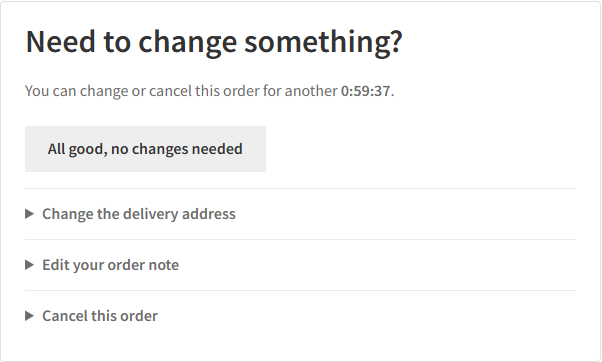
When changes stop
- When the time you allow has passed (5 minutes to 7 days, counted from payment; for cash on delivery, from the order date).
- When the customer says "All good".
- When the order ships: it is completed, a tracking number is added (WooCommerce Shipment Tracking, Advanced Shipment Tracking, AfterShip) or WooCommerce marks it fulfilled.
- When the order leaves the statuses you allow.
Every change is checked again on the server when it is made, so a page left open too long is refused.
Products you never offer changes for
Under Never offer changes for these products and Never offer changes for these categories, pick made-to-order or final-sale items. An order with one of them offers no changes. The customer sees "This order can't be changed online. Please contact us." Your own edits in the admin still work.
Guests and security
- Customers with an account make changes while logged in.
- Guests use the link from their order email. As on WooCommerce's own order pages, a guest coming back later from another browser first confirms the email address on the order, so a forwarded link alone can't redirect a parcel.
- Wrong links are limited per visitor and per order. They never lock out the order's own customer.
- At most 20 changes per order per hour.
On the Orders screen
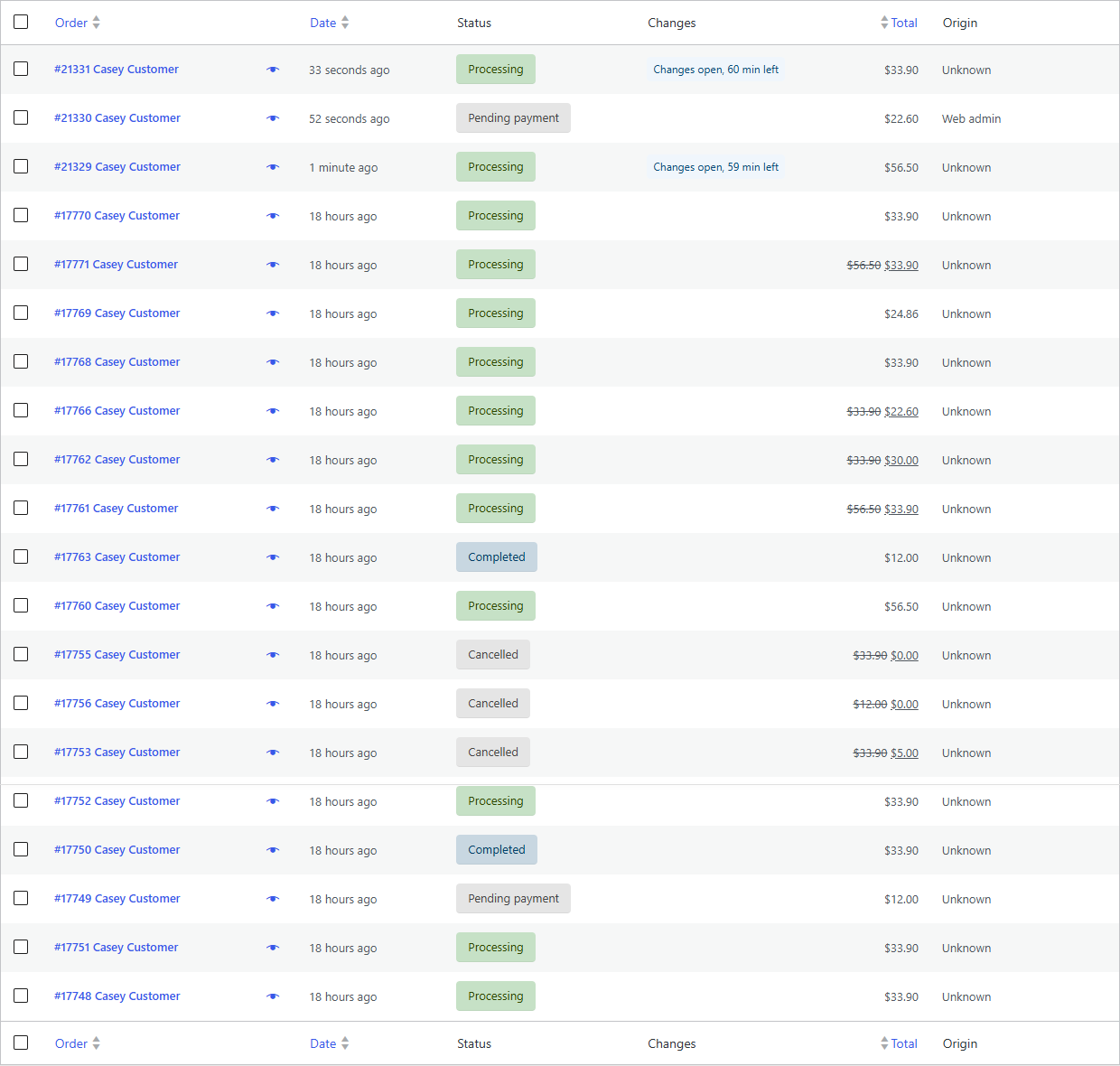
While a customer can still change an order:
- the Changes column shows a badge such as "Changes open, 2 h left";
- the Customer can still change view lists only those orders;
- the order's Edit order box says "The customer can still change this order until 3:40 pm."
Pack those orders once the time is up. Or turn on Open for changes.
The emails
The store gets "Customer changed an order" for each change. The customer gets "Order updated" with what changed and any refund. See Emails.