Cancellations
Customers can cancel their order from the customer panel while changes are open. You choose how under Cancellations in the settings.
Two modes
| Mode | What happens |
|---|---|
| I approve each request (default) | The request comes to you. The customer sees "Your cancellation request is waiting for the store." |
| Cancel and refund straight away | The order is cancelled and refunded at once |
Either way, a cancelled order:
- moves to Cancelled, so WooCommerce puts the stock back;
- is refunded in full through the payment method (nothing to refund for unpaid cash on delivery);
- takes its balance orders with it: unpaid ones are cancelled, paid ones are refunded too;
- gets an order note and a line in the activity log.
If the payment method can't refund, the order is still cancelled and flagged Manual refund needed.
Reasons and your policy
- Cancel reasons: the reasons customers pick from, one per line. "Other" is always added, with a box to explain.
- Require a reason: customers must choose or write one.
- Cancellation policy: text shown above the cancel button, for example your refund terms.
Answering a request
You get the "Cancellation requested" email. Then either:
- in the order's Edit order box: Approve and refund or Decline with a message;
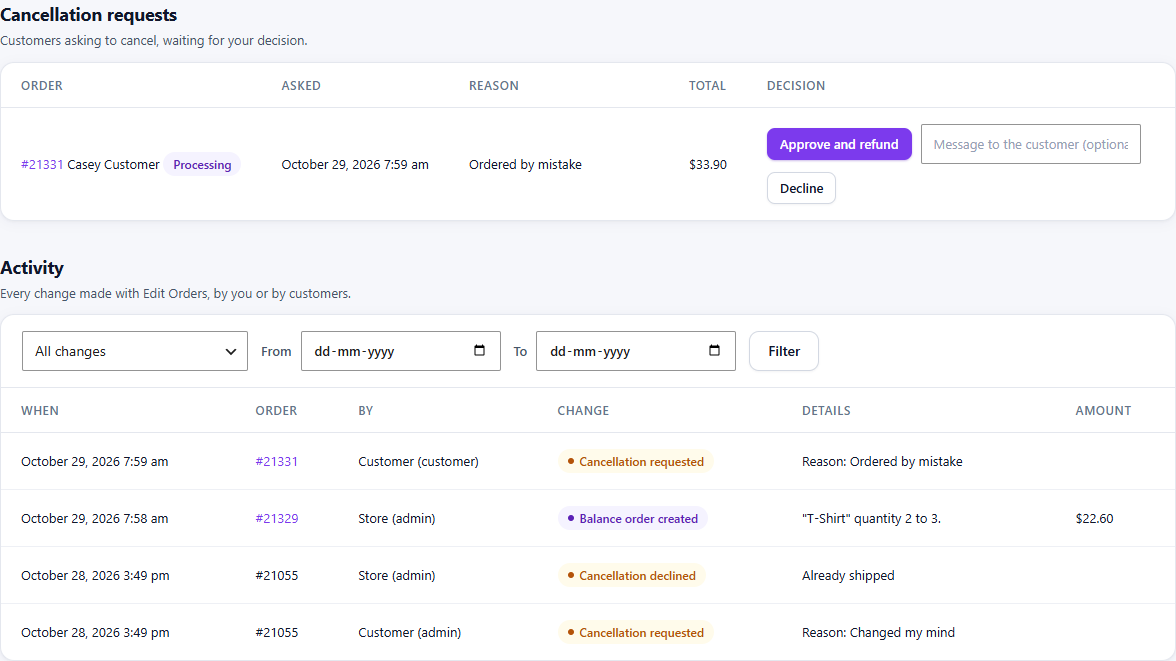
- on WPHEKA > Edit Orders > Activity, under Cancellation requests: Approve and refund or Decline with an optional message to the customer.
The menu shows how many requests are waiting.
| Your answer | The customer gets |
|---|---|
| Approve | "Order cancelled at your request", with the refund |
| Decline | "Cancellation request declined", with your message. The order is not changed. |
If the order has moved on since the customer asked (it shipped or was refunded or cancelled by hand), approving it closes the request without cancelling. It says why.